What Is the Best Way for Realtors to Share a Vendor List With Clients?
Learn the best way for realtors to share a vendor list with clients, from digital catalogs and direct vendor links to keeping recommendations current and easy to use.
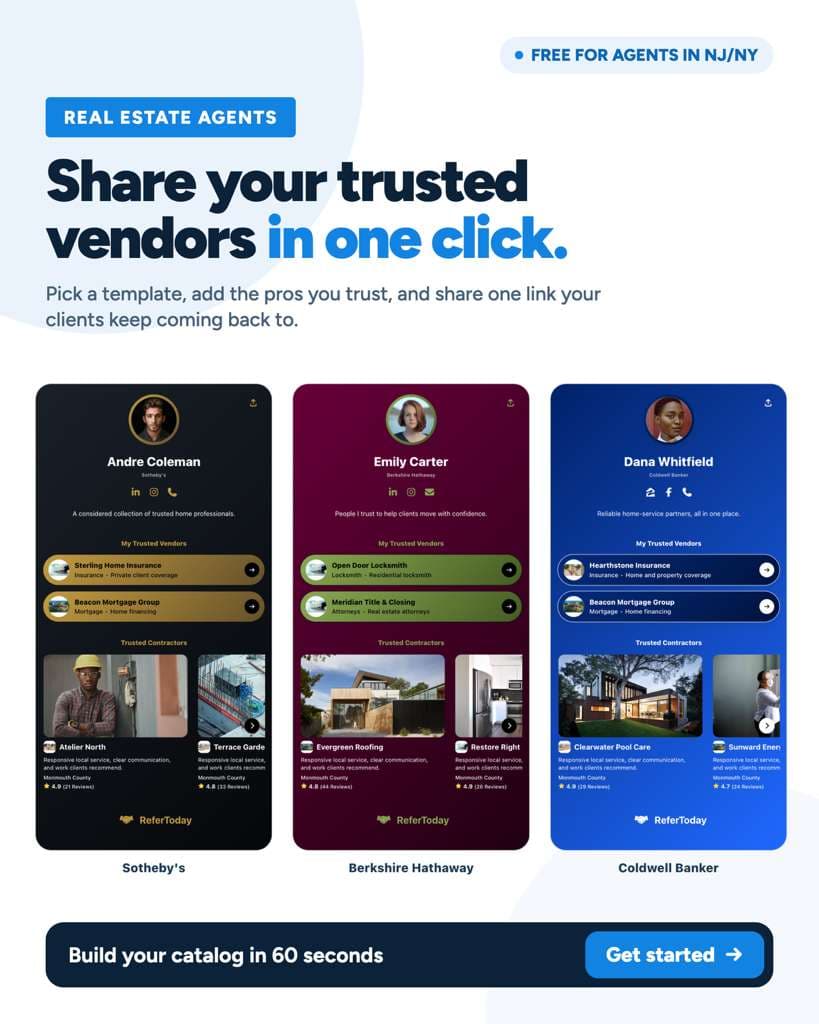
Quick Answer: "The best way for realtors to share a vendor list is through a branded digital catalog with one shareable link. Unlike PDFs or spreadsheets, a live catalog stays current, lets agents share one vendor or their complete list, works without a client app, and can make the introduction itself easier to track."
Top Questions About Sharing a Realtor Vendor List
Should realtors send clients a PDF vendor list?
A PDF can work, but it becomes outdated quickly and usually has to be resent whenever a vendor changes. A live digital vendor catalog is easier to maintain because the realtor can update recommendations while clients continue using the same link.
Should a realtor share one vendor or the entire vendor list?
Both options are useful. If a client asks for a specific service, sharing one trusted vendor can make the answer simple. When clients want broader homeowner resources, sharing the complete catalog gives them access to all of the realtor's recommendations in one place.
Do clients need an app to use a digital vendor catalog?
They should not have to. A client-friendly vendor catalog should open directly from a link so the client can browse recommendations without downloading an app, creating another account, or learning a new system.
Can a realtor text a vendor list to a client?
Yes. A shareable digital catalog link can be sent by text, email, or anywhere else the realtor normally communicates with clients. The same link can continue working as the realtor updates the catalog.
How can a realtor know if a client contacted a recommended vendor?
This is one of the advantages of using a referral platform instead of a static list. A platform can make the handoff trackable, so the agent can see whether a referral was sent, whether the client contacted the business, and how the introduction progressed.
What Is the Best Way to Share a Vendor List With Clients?
The best approach is to give clients one simple, branded place to access the professionals you trust.
The important word is simple.
A vendor list is supposed to save your client time. If they have to search through old emails, download a six-page PDF, find the right category, copy a phone number, and then explain to the contractor who sent them, the list has only solved part of the problem.
A better experience looks like this:
Your client asks, "Do you know a good roofer?"
You send them the roofer directly.
Or they ask, "Do you have a list of people you recommend for the house?"
You send one link to your entire vendor catalog.
They open it, browse the businesses you trust, and choose who they want to contact.
That is the model behind the ReferToday platform for realtors. Agents can keep their trusted professionals organized, share recommendations in seconds, and manage what happens after the introduction without relying on scattered texts and manual follow-ups.
Why Are PDFs and Spreadsheets Hard to Maintain?
PDFs and spreadsheets are useful for storing information, but they were not designed around the way clients actually ask realtors for recommendations.
The biggest problem is that they are static.
A plumber changes phone numbers.
A contractor stops serving your area.
A painter you used to recommend becomes difficult to reach.
You find a better landscaper.
A moving company expands into another county.
Now your old PDF is wrong.
You can update the file, but every client who saved the previous version still has the old information.
Spreadsheets create a different problem. They may be easy for you to edit, but they rarely feel like a polished client resource. A buyer asking for a locksmith does not necessarily want access to a spreadsheet with dozens of rows.
There is also no easy handoff.
The client still has to find the right business, copy the contact information, reach out, explain what they need, and potentially tell the vendor who referred them.
A digital catalog solves those problems by turning the list into a living resource rather than a file.
What Should the Client Experience Look Like?
A good vendor catalog should make finding help easier, not introduce another task.
The client experience should be straightforward:
- Open one link
- See that the catalog belongs to their realtor
- Browse trusted businesses by service
- Understand what each business does
- Choose the vendor that fits the need
- Contact the business or send a service request
- Return to the same catalog the next time they need help
There should not be a long setup process.
Clients should not have to download another app just to find the plumber their agent recommended.
They should not need a new login just to see the list.
They should not need to keep asking the agent to resend an updated file.
The easier the catalog is to use, the more likely clients are to actually use it.
That matters because the goal is not simply to create a vendor list.
The goal is to make your recommendations useful at the moment a client needs them.
Should Realtors Share One Vendor or the Whole Catalog?
Realtors should be able to do both.
Sometimes the client has a very specific problem.
"Who do you use for HVAC?"
"Do you know someone who can paint the bedrooms?"
"Who should I call about this leak?"
In those situations, sending one relevant vendor is usually the cleanest answer.
There is no reason to make the client browse 30 businesses when they asked for one plumber.
Other times, sharing the full catalog makes more sense.
A buyer who just closed may soon need a locksmith, painter, mover, cleaner, landscaper, electrician, handyman, and several other professionals. Giving that client your complete catalog turns it into an ongoing homeowner resource.
ReferToday is designed around both situations. An agent can share one trusted professional when the request is specific or send the complete catalog when the client wants access to the broader network.
That flexibility is important because not every referral starts the same way.
Where Should Realtors Share Their Vendor Catalog?
A digital vendor catalog should work wherever you already communicate with clients.
You should not need to change your workflow just to share it.
Send It by Text
Text is probably the most natural option when a client asks for a recommendation in the middle of a conversation.
They ask for a contractor.
You send the link.
Done.
Because the catalog is live, you do not need to search for the latest attachment before sending it.
Include It in an Email
A complete vendor catalog can be useful in buyer, seller, and post-closing emails.
Instead of attaching a document, add the catalog link and let clients return to it whenever they need something.
Share It After Closing
Closing is one of the best times to introduce the complete resource.
You can let the homeowner know:
"If you ever need someone for the house, I've put the people I recommend here."
That gives the client another reason to keep your information long after the transaction is over.
Add It to Your Website
If you have a personal website, the vendor catalog can also become a client resource linked from your site.
But a website should not be required.
A realtor should be able to create a catalog and start sharing it without asking a web developer to build another page.
Keep It in Apple Wallet
For agents who make recommendations constantly, keeping the catalog in Apple Wallet makes it easier to pull up and share when a client asks for help.
Instead of looking through bookmarks or notes, the catalog stays one tap away.
How Can Realtors Make the Introduction Easier for Clients?
Sharing a business name is useful.
Making the actual introduction is better.
Imagine a client tells you:
"We need someone to look at the roof after that storm."
The traditional process might be:
You send a roofer's name and number.
The client says thanks.
You do not know whether they call.
The roofer has no context when the client eventually reaches out.
A stronger handoff lets the realtor help start the conversation.
ReferToday includes an auto-fill request flow that allows an agent to enter the client's information, describe the service needed, and send the request directly to the business.
That can save the client from repeating everything and makes the referral more actionable.
It also changes the agent's role from:
"Here's somebody's number."
to:
"I've connected you with someone who can help."
That small difference can make the recommendation feel much more valuable.
How Can Realtors Track What Happens After Sharing a Vendor?
A vendor list becomes much more useful when the realtor can see what happened after the recommendation.
Traditional lists stop at the share.
You send the PDF.
You text the phone number.
You email the contractor.
Then you wait.
Unless the client or vendor tells you what happened, you may never know whether they actually connected.
That makes it difficult to understand which vendors are responsive and which recommendations are actually helping clients.
A referral platform can create more visibility.
The agent can see whether the client contacted the vendor, submitted their information, or moved forward with the job.
That feedback is useful even when no commission is involved.
If you continually send clients to a plumber and none of them get a response, that tells you something.
If another vendor consistently responds quickly and takes care of the people you send, that tells you something too.
Tracking makes the vendor catalog better over time because you are no longer choosing recommendations only from memory.
You can see which relationships are actually working.
How Should Realtors Keep Their Vendor Catalog Organized?
A realtor should be able to keep more vendors privately than they showcase publicly.
That solves an important problem.
You may know five plumbers, but you probably do not need to show clients all five.
You may have one contractor who handles large renovations, another who prefers smaller projects, and another who only serves part of your market.
Your internal vendor network can be larger than the client-facing catalog.
ReferToday lets agents store businesses in My Vendors and choose which ones they want to showcase to clients.
That means you can keep useful contacts available without turning your public catalog into another giant directory.
When a recommendation changes, you can swap a vendor in or out instead of rebuilding the entire resource.
A strong catalog should feel curated to the client even if your actual professional network is much larger.
What If a Realtor Does Not Have a Vendor for a Service?
You should not add a random business just because the category is empty.
If a client asks for something you do not currently have covered, that is a gap in your network.
The right response is to find a provider you are comfortable recommending.
ReferToday includes a marketplace of local businesses that agents can browse when they need a vendor outside their existing network.
That can be useful for categories you do not encounter often or when a client needs a professional outside your normal service area.
For example, you may already have:
- A plumber
- An electrician
- A painter
- A mover
- A cleaner
But a client suddenly asks for:
- A septic company
- A roofer in another county
- A pool professional
- A landscaper
- A specialized contractor
Instead of filling the catalog with random names in advance, you can expand it when an actual need comes up.
That keeps the list useful rather than bloated.
How Does Sharing Vendors Connect to Referral Commissions?
A vendor catalog and a referral commission program are not the same thing.
The first job of the catalog is to help clients find businesses the realtor trusts.
Some businesses may also offer referral commissions when an introduction turns into a completed job.
If a realtor participates in those arrangements, the compensation should not determine whether an unqualified vendor gets recommended.
Client fit comes first.
There may also be disclosure, brokerage, licensing, and legal considerations depending on the service and how the referral arrangement is structured.
If you are considering paid contractor referrals, read our guide explaining whether realtors can legally accept referral fees from contractors.
The important distinction is that a vendor catalog should remain useful even when no commission is attached.
A realtor's reputation is worth more than any single referral payment.
How Often Should Realtors Update Their Vendor Catalog?
A realtor should review the catalog whenever the quality or relevance of a recommendation changes.
You do not need to rebuild it every month.
Instead, update it when something meaningful happens.
Consider removing or replacing a vendor when:
- Clients repeatedly struggle to get a response
- The company no longer serves your market
- Contact information changes
- The quality of service drops
- The vendor changes ownership
- Your clients consistently prefer another provider
- You no longer feel comfortable making the recommendation
You should also add vendors when you discover a strong provider in a category clients frequently ask about.
The benefit of a live catalog is that these changes do not require a new PDF.
You update the recommendation once.
The same link clients already have stays useful.
Do Realtors Need a Website to Share a Digital Vendor List?
No.
A realtor should not need a website, web developer, or brokerage technology team just to share trusted vendors with a client.
A standalone vendor catalog gives you a link that can be sent directly.
That matters for agents whose brokerage website is controlled at the corporate level or agents who do not maintain a personal site.
If you do have a website, you can link to the catalog there.
But that should be an additional distribution channel, not a requirement.
The simplest workflow is still the most useful:
Client asks.
Agent shares.
Client opens.
What Makes a Vendor Catalog Better Than a Link-in-Bio Page?
A link-in-bio page and a vendor catalog solve different problems.
A link-in-bio page is primarily designed to organize links about you.
It might contain your listings, social profiles, website, reviews, contact information, and other marketing destinations.
A vendor catalog is built around the client's need.
The question is not:
"Where can I follow my realtor?"
The question is:
"Who does my realtor recommend for this?"
That changes what the experience should do.
A useful vendor catalog should organize trusted service providers, make individual vendors easy to share, support direct introductions, and help the realtor understand what happened after the recommendation.
It should feel like a client resource, not another marketing menu.
Can Teams and Brokerages Use Vendor Catalogs Too?
Yes, but the structure should still preserve the value of the individual agent's recommendations.
A brokerage may have hundreds of vendor relationships, but clients usually ask their agent:
"Who do you recommend?"
That personal trust is what makes the list useful.
Teams and brokerages can still benefit from shared vendor infrastructure. They may want common catalog templates, more vendor storage, or visibility into which referrals agents are making.
But individual agents should still be able to curate the professionals they personally want clients to see.
That keeps the catalog from turning into another generic office directory.
What Should Realtors Look for in a Vendor Catalog Tool?
The best vendor catalog tool should reduce work for both the realtor and the client.
Look for a system that lets you:
- Create your own branded catalog
- Add professionals you already trust
- Keep additional vendors without displaying all of them
- Organize recommendations clearly
- Share one vendor directly
- Share the entire catalog through one link
- Send the link by text or email
- Let clients access it without downloading an app
- Update recommendations without changing the link
- Send a client's service request directly to a vendor
- Track what happens after an introduction
- Add new vendors when a category is missing
- Keep the catalog easily accessible when a client asks for help
The technology should disappear into the relationship.
Your client should not think:
"My realtor has a complicated referral system."
They should think:
"My realtor always knows who to call."
That is the outcome that matters.
Give Clients One Place for Every Trusted Recommendation
Clients are already going to ask you for contractors, movers, inspectors, painters, plumbers, electricians, cleaners, landscapers, and other home professionals.
The question is whether those recommendations live across old texts, PDFs, spreadsheets, and contact lists or whether you give clients one resource they can actually keep using.
A good digital vendor catalog lets you stay helpful without creating more administrative work.
You can share one vendor when the need is specific, share your entire catalog when the client wants a homeowner resource, update recommendations without resending a file, and make the handoff easier when someone is ready to contact a business.
ReferToday gives realtors a branded vendor catalog built for exactly that workflow. Add the professionals you already trust, choose which ones clients see, share your catalog through one link, and continue improving it as your network grows.
Create your free vendor catalog on ReferToday and start with the professionals you already recommend.
Questions Realtors Ask About Sharing Vendor Lists
What is the easiest way to send a vendor list to clients?
A shareable digital catalog is usually the easiest option because the realtor can send one link by text or email. Clients can return to the same link later, while the realtor can keep the underlying recommendations current.
Is a digital vendor catalog better than a PDF?
For an actively maintained vendor list, usually yes. A digital catalog can be updated without sending a new file, while clients who save a PDF may continue using an outdated version.
Should I send clients my whole vendor list?
Not every time. If a client asks for one specific service, sharing one trusted provider or a few relevant choices can be simpler. The full catalog is useful when you want clients to have an ongoing resource for future homeowner needs.
Do clients need to download the ReferToday app?
No. Clients can access a shared ReferToday catalog or vendor recommendation through a link without downloading an app.
Can I send a client's request directly to a vendor?
Yes. ReferToday includes a request flow that allows the agent to enter the client's service information and send it directly to the business, making the handoff easier than simply sharing a phone number.
Can I keep vendors without showing all of them to clients?
Yes. Realtors can keep businesses in their vendor collection and choose which ones they want to showcase on the client-facing catalog.
What if I do not have a trusted vendor for a category?
You can build the catalog gradually. If a client needs a service you do not have covered, you can look for an appropriate business and expand your catalog rather than filling every category with generic recommendations from the beginning.
Do I need my own website to use a vendor catalog?
No. A digital vendor catalog can work through its own shareable link. Realtors can text or email the link directly, whether or not they maintain a personal website.